In most of my projects I had the requirement of storing additional data to SharePoint User. For these scenarios SharePoint user profiles match best because they are flexible and easy to extend with a lot of different data types.
In this article I show a fast and flexible way to import data to SharePoint Online User Profiles. The import data can be stored in a tab separated text file. There are several challenges to master until the data can be imported.
REST API vs. User Profile Web Service
In general it is recommended to use the new REST APIs. These new APIs provide methods to read and write data but the user profile REST api is one big exception. This only allows to read data. The only thing that can be changed is the user profile image.
To write data to the SharePoint Online User Profiles the SOAP web service needs to be used. In an on-premise installation this web service can be accessed from any site collection in a SharePoint Farm. The location of this web service is /_vti_bin/userprofileservice.asmx. Sadly this is not possible in the cloud.
In Office 365 there is only one location for accessing this web service that works. This can be found in the SharePoint Administration. The base url to the SharePoint Administration is http://yourcompany-admin.sharepoint.com/ . The part “yourcompany” is dynamic and needs replaced by your subscription name. If this base url will be extended by the location of the user profile web service we get a working instance. The url is then will look like http://yourcompany-admin.sharepoint.com/_vti_bin/userprofileservice.asmx.
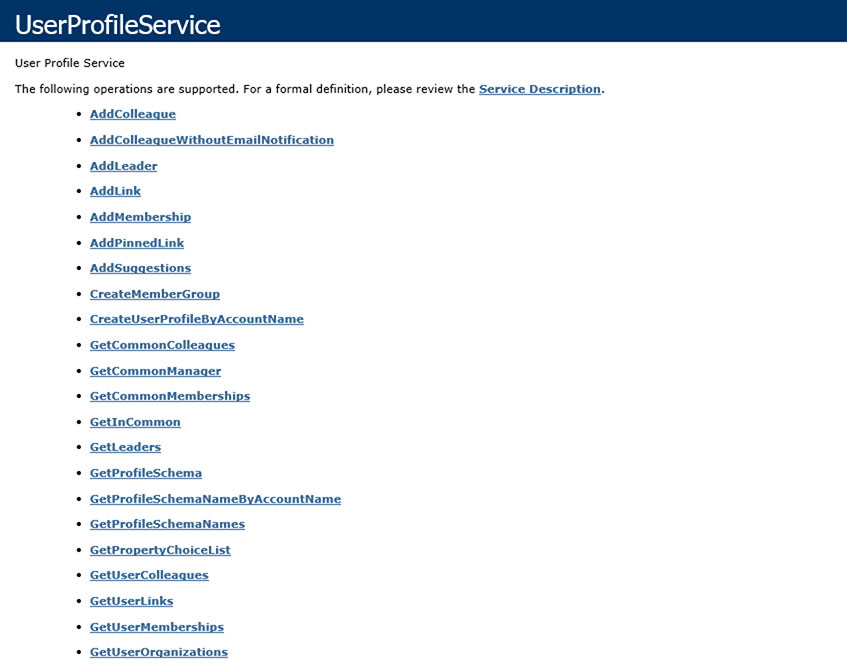
See the working description of the user profile web service in Office 365
Authenticating against the web service
The next challenge that needs to be mastered is how to authenticate against this web service. In an on-premise installation the authentication is simple. All that needs to be passed to the web service are valid credentials defined by username and password. In Office 365 the authentication is a bit different and an authentication cookie needs to be passed.
The longer explanation how to authenticate against Office 365 work can be found in the MSDN article Remote Authentication in SharePoint Online Using Claims-Based Authentication. Another great source of information is the blog post “How to do active authentication to Office 365 and SharePoint Online” by Wictor Wilén. In this article Wictor provides a helper object that makes the authentication process easy. His solution is mainly targeted on SharePoint 2010 in Office 365 but this still works in the recent version of SharePoint Online.
Possibly the best way to authenticate is by using newly with SharePoint 2013 introduced SharePointOnlineCredentials object. With only a couple lines of code the authentication succeeds.
// Pass the username and password to SharePointOnlineCredentials constructor
// Password needs to be passed as a System.Security.SecureString
SharePointOnlineCredentials onlineCred = new SharePointOnlineCredentials(_username, mySecurePassword);

// Get the authentication cookie by passing the url of the web service
string authCookie = onlineCred.GetAuthenticationCookie(_adminUrl);

// Create a CookieContainer to authenticate against the web service
CookieContainer authContainer = new CookieContainer();

// Put the authenticationCookie string in the container
authContainer.SetCookies(_adminUrl, _authCookie);

// Setting up the user profile web service
UserProfileWS.UserProfileService upService = new UserProfileWS.UserProfileService();

// assign the correct url to the web service
upService.Url = _adminUrl.AbsoluteUri;

// Assign previously created auth container to web service
upService.CookieContainer = authContainer;
All of the code above requires parts of the .net framework and the managed client object model of SharePoint.
Data source to import user profile data
Now with all the parts together we are ready to build a bulk updater. I won’t go too much into detail on the code because the rest is pretty much straight forward and can be found in the downloadable solution below. Let’s just take a look how the importer works and part of this process is to have a working data source.
As mentioned in the introduction the importer works with a tab separated text file. In this file the first line needs to contain all the property names that should be imported. The only required property in there is the property “AccountName” because this will be used to find the user. The other columns need to have the name of the properties. I don’t use the display names because they are not unique and can vary by language.
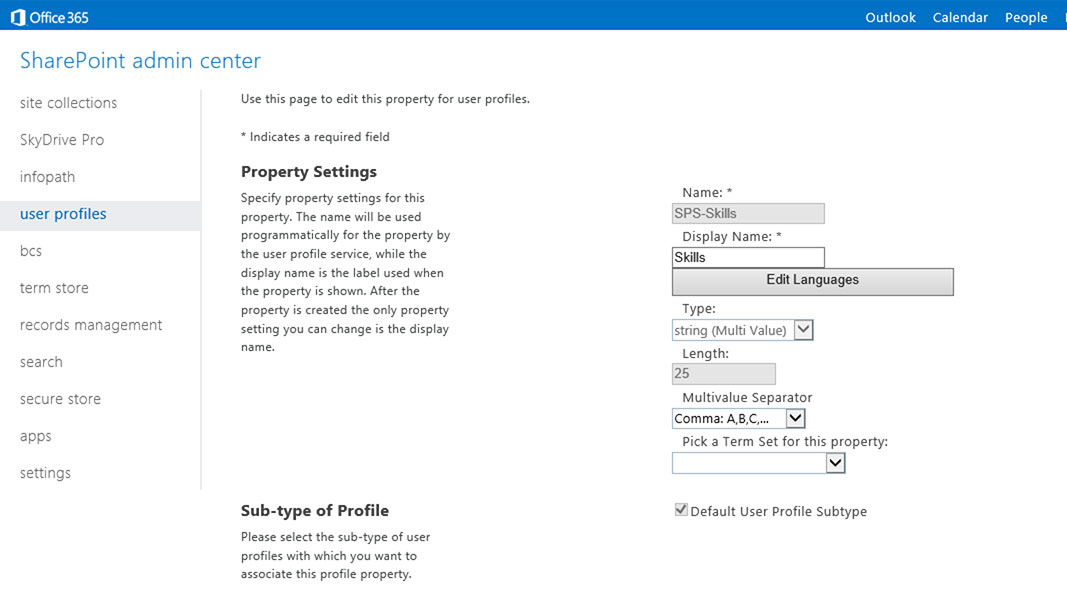
Shows the “Skill” property in the user profile properties configuration
By adding the demanded properties the importer is flexible and don’t need to be adapted in the code. The following screenshot shows a sample import file.

Sample import file for user profile update to SharePoint online
This file contains only the birthday (SPS-Birthday) and the skill (SPS-Skills) property. The skill property is a multi value field that stores the terms directly to the keyword store. The single values can be delimited by a comma or semi-colon.
Even other user accounts can be specified for example if the manager attribute needs to be filled. The claim encoded user name needs to be added to the text file in a format like this i:0#.f|membership|[email protected] .
Steps to update the user profiles
Now that the data source is defined the updater executes the following steps.
- Authenticate against SharePoint Online Administration to get the authentication cookie and pass it to the user profile web service
- Open the file and read the first line to get a list of properties that should be imported
- Read the rest of the file and try to update the profiles
To execute the updater needs the following parameter in order to work.
- URL to the SharePoint Administration
- Username that should be used to authenticate
- Path to the data source
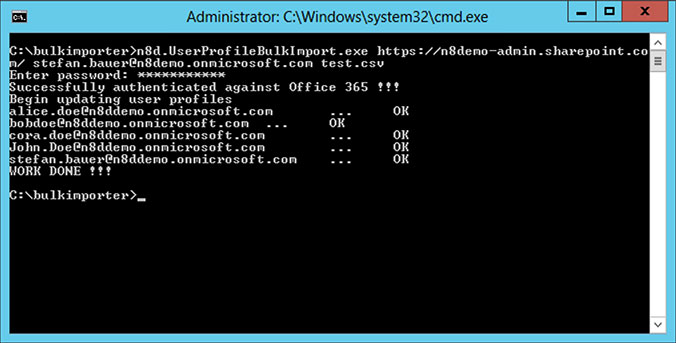
Shows the usage of the user profile bulk updater
After the update the profile properties look like this:
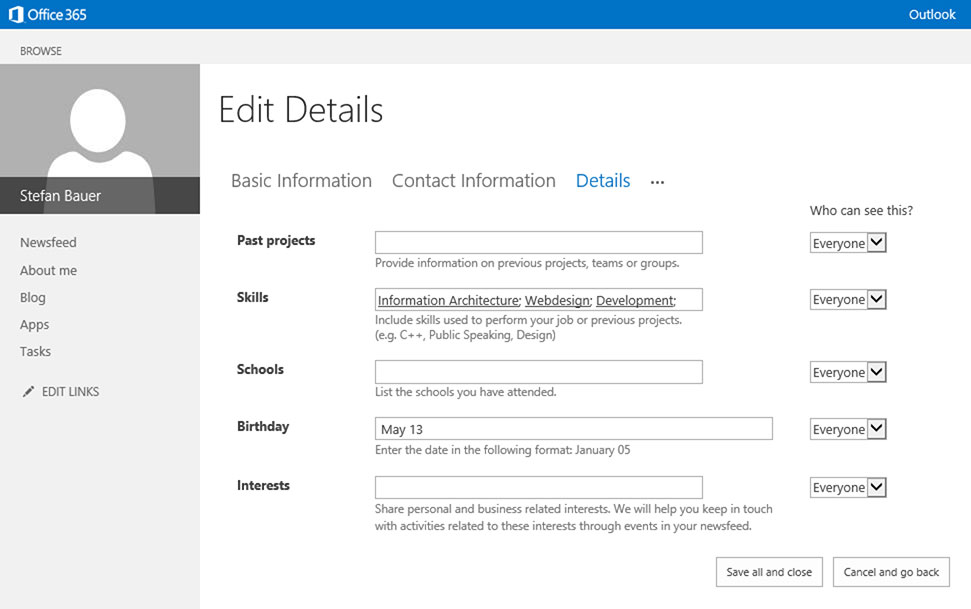
View the user profiles after update
Conclusion
The new API’s are great but some things still need to be done the old fashion way until they provide the same functionality. I hope this tool will help during the migration process from an on-premise installation to the cloud.
I think this is also a great opportunity to enrich the SharePoint Online user profiles in general. Instead of asking the user to enter their data once again.
** Update 30th June 2014 **
For those who are looking for a complete list of default properties that matches the Display Name of the fields. This list can be found on the Technet Default user profile properties (SharePoint 2010)
Disclaimer:
I tested this tool in many ways. Before you do a bulk update on all user profiles please re-test it, just with a single test user and make sure that the data have been written to SharePoint Online correctly. Also make sure that the data source is well formatted.
You will use it at your own risk.
Source code download from MSDN Code Gallery
Tool Download: n8d.UserProfileBulkImport Tool
This is very good and helpful resource. Thank you !
we don’t have AD synch with office 365 and we would like to update Manager properties for all the users in sharepoint online. I was run the tool to update manager value but got error. please help on this.
Can you please be a little bit more specific what error you got? To update the manager attribute please make sure that you have the property formatted correct.
You should specify the full claim user name. For example:
i:0#.f|membership|stefan.bauer@myoffice365.com
The first part specifies the claim that should be used while the second part is the Account Name.
Hi, Thanks for the userful article. I downloaded the tool buts it giving me acception after successfully authenticating
Unhandled Exception: System.Web.Services.Protocols.SoapException: Server was una
ble to process request. —> Object reference not set to an instance of an objec
t.
at System.Web.Services.Protocols.SoapHttpClientProtocol.ReadResponse(SoapClie
ntMessage message, WebResponse response, Stream responseStream, Boolean asyncCal
l)
at System.Web.Services.Protocols.SoapHttpClientProtocol.Invoke(String methodN
ame, Object[] parameters)
at n8d.UserProfileBulkImport.UserProfileWS.UserProfileService.GetUserProperty
ByAccountName(String accountName, String propertyName)
at n8d.UserProfileBulkImport.UserProfileUpdater.Update()
at n8d.UserProfileBulkImport.Program.Main(String[] args)
Hi Vinay,
have you used the SharePoint admin url or the portal url?
Kind regards
Stefan
Thanks Stefan, it is working now. I was using wrong separator in import file instead of tab.
It’s a nice little tool. Appreciate you putting it up on internet.
is there away to get this to work in VS 2013?
You just need to upgrade the solution to VS 2013 but it should work.
Thanks for this Stefan.
I’m afraid I’m just a site administrator and I have no background in MS programming so please excuse the newbe question.
What are the prerequisites for running the tool? It is not finding the Microsoft.Sharepoint.Client.runtime. I have placed a copy of the DLL in the source directory but no luck.
Hi Steve,
you can download a copy of the client components SharePoint Server 2013 Client Components SDK
. After you downloaded and installed this you should be able to get this work. If you look for the Assembly please navigate to the “your windows folder\assembly\”. This is the so called global assembly cache where all the global dll are stored. You should then see in the list of assemblies the Microsoft.SharePoint.Client.runtime there. Hope this helps if not I will check it directly in one of my VMs.
/Stefan
Thanks Stefan. That did the trick. Process worked as advertised. It takes some time for the changes to get sync’d out in the sharepoint.com world. but now that is done the changed data is in place.
Great to have a good sample as starting point for our process. It looks like the O365 – sharepoint.com sync is seriously limited so having a fallback keeps our project from going off the rails.
Thanks again
Glad I could help. If you need further assistance please feel free to ask again 😉
/Stefan
Stefan, I am not a developer but I am trying to accomplish many of the same things folks have listed here. I am trying to use your tool but when I enter my password I get an error that states: “The partner returned a bad sign-in name or password error. For more information, see Federation Error-handling Scenarios.” I am a site collection administrator. I even changed my password and allowed the weekend for everything to sync. We are using ADFS but I changed my passwords with Microsoft to all match. Any suggestions?
I suggest you have tried it with your administration account that comes with the federation. You also have a pure Office 365 tenant administrator. You should try this account. The sign-in method I use to authenticate supports only pure Office 365 authentication but not ADFS user.
This I think is the cause of this error message.
This is really very helpful.Thanks for the Post.If we want to create or migrate Custom profile properties from SharePoint 2010 to Office365,how we can achieve it?
Please help on this.
The CSV import supports those custom property import. All you need to do is to specify the name of the property on the first line. Unfortunately I don’t have a script ready that exports it from the on premise installation but you might find one on the web.
/Stefan
Hi Stefan,
The tool is really good.
I have a little issue, some of my users are in office365 but have never log in the sharepoint site, so the User Profile is not created.
How can I bulk create the user profile first?
Hi Julian,
thank you for your feedback. Currently I don’t support the bulk creation of the profiles but it can be done with code. You might will find some powershell that does the job.
/Stefan
Hello Stefan,
How do we bulk upload employee id or Skills to Manage User Profiles in Sharepoint online in Office 365.
Please help me on this.
Regards,
Srinivas.K
Please make sure that the CSV is Tab separated and not delimited by comma. The skills go directly into the managed meta data. The field name is SPS-Skill and you should check how the various items are delimited. This can be semicolon or a comma. You text file need to have the same delimiter inside.
/Stefan
Hello Stefan,
After getting the authentication, I am getting the below error.
Unhandled Exception: System.Web.Services.Protocols.SoapException: Server was una
ble to process request. —> Object reference not set to an instance of an objec
t.
at System.Web.Services.Protocols.SoapHttpClientProtocol.ReadResponse(SoapClie
ntMessage message, WebResponse response, Stream responseStream, Boolean asyncCal
l)
at System.Web.Services.Protocols.SoapHttpClientProtocol.Invoke(String methodN
ame, Object[] parameters)
at n8d.UserProfileBulkImport.UserProfileWS.UserProfileService.GetUserProperty
ByAccountName(String accountName, String propertyName)
at n8d.UserProfileBulkImport.UserProfileUpdater.Update()
at n8d.UserProfileBulkImport.Program.Main(String[] args)
Please let me know what mistake I am doing here.
Regards,
Srinivas.K
During my testing I got the same error when I tried to access the web service from a site collection URL. Please make sure that you pass in the SharePoint Administration URL from Office 365 and not the one of the portal.
/Stefan
Hi Stefan,
thanks for the tutorial!
I somehow get the error “Identity Client Runtime Library could not look up the realm information for a federated sign-in.”.
Do you know if this error is related to the code, any dlls or the credentials (which seem to be right)?
Thanks! Max
Hi Maximilian, I always tried this code with an real Office 365 Admin not a federated one. You can also check out a similar sample in the Office 365 Pattern and Practices
Maybe you get this running.
/Stefan
Hey Stefan,
thanks for the instant reply! It worked smoothly with my colleague’s account. Great!
I saw the PnP solution before and embarrasingly still do not know how to find/generate the .exe file..?
Thanks again for your work and help!
Hi Max,
to generate the solution you need to open it in Visual Studio and compile it manually. Glad to hear that it works for you now.
/Stefan
Thanks Stefan! Do you know if there is a way to include commas in a single value field? It seems to serve as some kind of blocker that cuts the rest of the field to be imported.
Both ” and ‘ are entered in the field. I try to insert something like “Wien, sterreich” (without “).
Thanks a bunch!!
Hi Maximilian,
from my point of view it shouldn’t be a problem with my code because I use tab-stops as delimiters so it shouldn’t split the common. You also don’t need the quotes. I haven’t tested it but I think it should work. Is there a special error you got back?
/greetings
Stefan
Every time I’m running the tool, it tells me that n8d.UserProfileBulkImport has stopped working. It is always breaking with a SOAPException was unhandled. Any ideas as to why this is happening. Thanks
Hi Scott,
sorry haven’t used the code in a while. Maybe Microsoft has changed something in the background.
Have you tried to pass in the url to the Office 365 admin interface?
/Greetings
Stefan
Stefan,
Got it working. My Text File was saved as UTF-8 Encoded. Once change to ANSI it worked like a charm.
Great. Thanks for the update!
/Stefan
Great. Thanks for the update!
/Stefan
Hi Stefan,
Firstly, great tool. However I am finding an issue. The tool advises that Server was unable to process request. —> UserProfileDBCache_WCFLogging :: Prof
ileDBCacheServiceClient.GetUserData threw exception: Data Not Found: Invalid con
figuration. —> Data Not Found: Invalid configuration. —> The creator of this
fault did not specify a Reason.
Server was unable to process request. —> UserProfileDBCache_WCFLogging :: Prof
ileDBCacheServiceClient.GetUserData threw exception: Data Not Found: Invalid con
figuration. —> Data Not Found: Invalid configuration. —> The creator of this
fault did not specify a Reason.
Unhandled Exception: System.Web.Services.Protocols.SoapException: Server was una
ble to process request. —> UserProfileDBCache_WCFLogging :: ProfileDBCacheServ
iceClient.GetUserData threw exception: Data Not Found: Invalid configuration. —
-> Data Not Found: Invalid configuration. —> The creator of this fault did not
specify a Reason.
at System.Web.Services.Protocols.SoapHttpClientProtocol.ReadResponse(SoapClie
ntMessage message, WebResponse response, Stream responseStream, Boolean asyncCal
l)
at System.Web.Services.Protocols.SoapHttpClientProtocol.Invoke(String methodN
ame, Object[] parameters)
at n8d.UserProfileBulkImport.UserProfileWS.UserProfileService.GetUserProperty
ByAccountName(String accountName, String propertyName) in c:\Projects\n8d.UserPr
ofileBulkImport\n8d.UserProfileBulkImport\Web References\UserProfileWS\Reference
.cs:line 531
at n8d.UserProfileBulkImport.UserProfileUpdater.Update() in c:\Projects\n8d.U
serProfileBulkImport\n8d.UserProfileBulkImport\UserProfileUpdater.cs:line 70
at n8d.UserProfileBulkImport.Program.Main(String[] args) in c:\Projects\n8d.U
serProfileBulkImport\n8d.UserProfileBulkImport\Program.cs:line 58
Hi,
Have a Authentication Problem:
C:\bin\UserProfileBulkImport>n8d.UserProfileBulkImport.exe https://amiltd-admin.sharepoint.com/ [email protected] import.csv
Enter password: ***********
The partner returned a bad sign-in name or password error. For more information
see Federation Error-handling Scenarios.
I do this from the Win2012R2 server.
+ 2 cents: fore example:
If [email protected] password is: qwerty and i`m enter this pasword i see:
******
This is Ok.
But, when i press key “Enter’ – i see new “*” and after this:
*******
and see error…
Please, help me
Thanks
I was able toupdate custom properties for all user, but if try to setup Time Zone property i get below error
Input file has
AccountName SPS-TimeZone
[email protected] (UTC-05:00) Eastern Time (US and Canada)
ERROR
Begin updating user profiles
Server was unable to process request. —> Invalid time zone format. The value must be SPTimeZone object, a valid integer time zone ID, or a string representation of a valid integer time zone ID.
Hi,
never had to set the time zone. I think the best way to find out the correct format will be if you set it manually.
After that read the value that have been stored on the time zone.
I think this should work. If you have still troubles I check it in one of my development environments
/Stefan
Thanks
I was able to figure it out TimeZone property needs integer value
Like form UTC eastern time, we need to put 76
BTW have used your script to upload user picture on profile picture properties. That’s my next requirement I working on
n this case take a look at the Office PNP Sample. https://github.com/OfficeDev/PnP/tree/master/Samples/Core.ProfilePictureUploader
The pattern and practices group provide code for a bulk uploader for profile pictures.
Ya i have use that one initially.
In your scripte if user is not found online it will error out and stop, is it possible to add logic to check “Msoluser ” if not found skip so script will keep running for 20-40K user update.
let me know if it possible where should i update code.
The easiest way you can do is to execute EnsureUser before it tries to update the user.
Hi Stefan,
danke für das coole Tool. Weißt du wie man das Thema Umlaute lösen kann?
DasDas Tool ist schon ein wenig in die Jahre gekommen. Ich würde deshalb eher den UPA Profile properties importer empfehlen – https://dev.office.com/blogs/introducing-bulk-upa-custom-profile-properties-update-api
Das wird noch aktiv weiterentwickelt.
lg
Stefan
Hi Stefan,
Thank you for sharing this tool.
We are trying to use the tool but we keep getting “The partner returned a bad sign-in name or password error. For more information, see Federation Error-handling Scenarios.”
We are the SharePoint Admins and are sure the account credentials are correct.
Can you shed some light?
Do you know if any recent patches might have affected it working correctly?
I have been using this tool successfully for the past 5 years, however now I get the error “Something went wrong but no exception was raised sorry
WORK DONE !!!” right after I authenticate. I don’t think it’s even passing the password as it’s the same error if I type the correct or incorrect password. I have reinstalled the Sharepoint client component, and tried from a different computer. Any assistance would be appreciated!
Hello Stefan, I can’t seem to run the application any longer. I get an error that states “Something went wrong but no exception was raised sorry WORK DONE !!!” after I input my password. I have not had any issues for the past 5 years, so I’m not sure what changed, or what I might be doing wrong. Any help would be greatly apprecaited!